
Create an event with a voice command
On To Gather you can create an event by dictating a single sentence. Tap the mic, say “Set up drinks tomorrow at 7pm at The Fitz with my high school crew”, and the AI voice assistant fills in the title, date, time, place and friend circle. You just review and confirm. No form, about ten seconds instead of over a minute by hand.
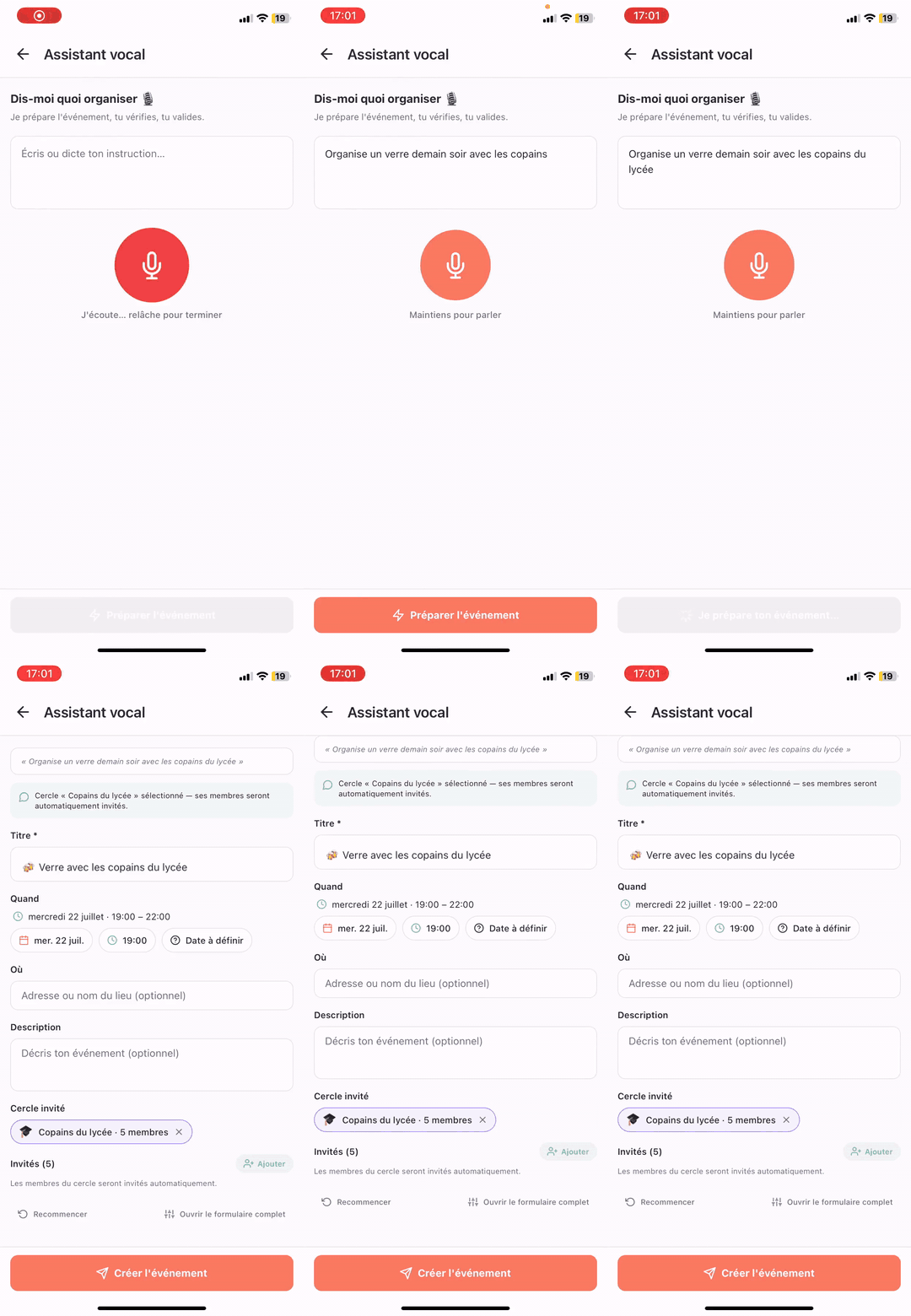
Try the voice assistant now
Open To Gather, tap the mic on the event creation screen and speak your plan. The AI handles the rest.
How does it work?
The assistant listens to your sentence, turns it into text, then a language model extracts the useful bits for an event: what, when, where, with whom. Everything comes back as an editable draft — nothing is published until you confirm.
1. You speak
One sentence is enough. French or English, natural tone, everyday phrasing (“tomorrow night”, “next Saturday”, “with the running crew”).
2. The AI extracts
Title, date, time, place if mentioned, and which circle to invite (“my high school crew” → your High School circle).
3. You review
The create screen opens with every field pre-filled. Tweak anything, add or remove guests.
4. You confirm
One tap and invites go out. Automatic 1-hour reminder, group chat created, BeReal photo moment shared on the night.
Voice commands that work well
The AI understands casual language. Here are phrasings that produce a clean event on the first try.
“Drinks tonight at 8pm at The Comptoir with the work crew”
Title: Drinks at The Comptoir · Tonight 20:00 · Place: The Comptoir · Circle: Work
“Run Sunday 8:30am at Central Park with the running team”
Title: Run at Central Park · Sunday 08:30 · Circle: Running
“Surprise party for Marie next Saturday 9pm at my place”
Title: Surprise party for Marie · Next Saturday 21:00 · Secret chat enabled
“Movie Friday night with Lea and Tom, we'll pick the film together”
Title: Movie · Friday night · Guests: Lea, Tom · Optional time poll
Why dictate instead of filling in a form?
Creating an event by hand means jumping between several fields — title, date, time, place, guest picker. Each field adds a chance to forget or mistype something. Voice brings organizing a night out back to the most natural gesture: talking. It's especially handy on the go (on the subway, walking, in the car) when a plan pops into your head.
- About 10 seconds vs over a minute by hand.
- No forgotten field: the AI fills in everything it detects.
- Named friend circles are recognized (“my high school crew”, “the running team”).
- Natural dates supported: “tomorrow”, “next Saturday”, “the 12th”.
Privacy: what happens to my voice?
Audio is processed to be turned into text, then immediately discarded — we keep neither the recording nor the raw transcript once the event is created. The draft stays local to your device until you confirm. No guest is notified before you tap “Create”.
See also
Organize a group event
See also
Plan a night out with friends
Voice assistant — frequently asked questions
Which languages does the voice command support?+
French and English. The AI auto-detects the language of the sentence you dictate.
Does it work offline?+
No. Transcription and understanding use hosted models, so an internet connection is needed. If the network is flaky, the app shows an error and you can retry or switch to manual entry.
The AI sometimes makes mistakes — then what?+
Everything is editable before you confirm. The create screen shows every field; you can fix the date, change guests, refine a place. Nothing is published until you tap “Create”.
Is it paid?+
No. The voice assistant is included in To Gather for free, with no usage quota for normal use.
Can I create a date-to-be-confirmed (TBD) event by voice?+
Yes. If you don't mention a date (“set up a brunch with the roommates, we'll pick a day”), the event is created in TBD mode and guests can propose and vote on slots.
Can the assistant create a running event for a running club?+
Yes. If your account is set to “running club”, the specific fields (start point, distance, level) are pre-filled as soon as they're mentioned.
Ready to create your next event by voice?
Download To Gather and dictate your next plan in one sentence.